Exam Configuration Options
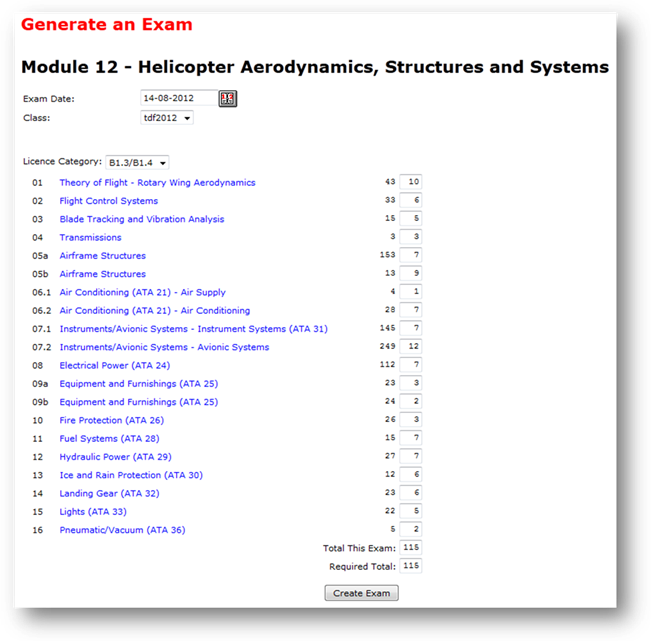
The following options and controls are available on the Exam Generator page, and must be configured prior to generating an exam:
Exam Date: Set the exam date to the date on which the
examinees will take the exam. The default date is the current date, but you can
change the date to any date in the future.
It is normal to generate an exam some days before the date on which the
examinees will actually take the exam. You can edit the date in the date field
directly, or click the calendar tool
( ), to use
the pop-up date selector.
), to use
the pop-up date selector.
Class: Select the Class that will be taking the exam from the drop-down menu. Every examinee that is registered in that Class, and who is also currently registered for the respective Module (see Registering an Examinee), will automatically be registered for the exam you are currently generating.
Licence Category: Choose from the drop-down list, the Licence Category (A1, B1, B2 etc.) of the exam you will generate. All licence categories relevant to the Module, in accordance with the EASA Part-66, will be available to select. The number of questions available in the database (displayed next to each subsection) may change when you select a different Licence Category, because questions are categorised by Level (1, 2 or 3) in accordance with the EASA Part-66 syllabus.
Subsections: These are listed in accordance with the way they were set-up in the Control Panel (Manage Subsection). The Subsection number and the Subsection name is displayed. You can hover the computer mouse curser over the Subsection description to show the content breakdown of the respective subsection. This content breakdown is usually that which is specified in the EASA Part-66 syllabus, but may show additional information as you require. The content breakdown information can be changed in the Control Panel (Manage Subsections).
Number of Questions: The number of questions that will be randomly selected are displayed in the column at the right of each Subsection listing.
The first column is the number of questions that are available in each subsection. This number is the number of Approved questions. If there are no approved questions in the subsection, then the subsection will not show on the Subsection list at-all.
The second column of numbers is the number of questions that will be randomly selected from each subsection. These numbers are displayed in editable boxes, which are pre-filled with numbers that have already been entered in the Control Panel (Manage Modules). These numbers can be overwritten. When the exam is generated, it will be generated using the number of questions that you have specified in this column.
The total number of questions that will be used in the exam is automatically calculated and displayed in the box at the bottom of the column titled Total This Exam. For reference, you can compare this with the Required Total which is displayed below it. This number is usually in accordance with the EASA Part-66 syllabus and is the minimum number of questions to be used in each Module exam required by EASA. You can change this number in the Control Panel (Manage Modules).
Related Topics
Copyright (c) 2012 Total Training Support Ltd