Searching and Filtering Questions
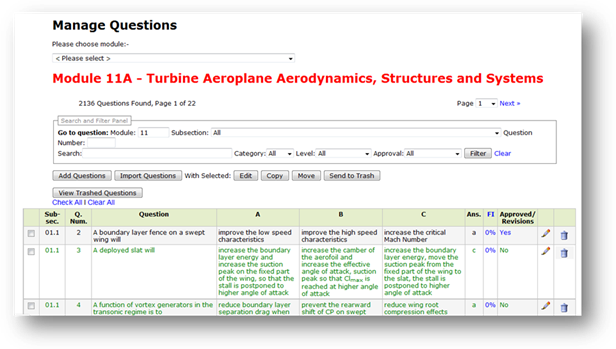
Select Edit Questions on the main menu, then choose the Module which you want to upload the questions to, from the dropdown menu (only those modules for which you are subscribed to, will be available).
The questions contained within the Module are listed in pages of 100. You can view other pages by selecting the page from the Page dropdown select.
· Black questions are questions that are available for use during an exam generation. They have been approved by a subject specialist.
· Green questions are questions which are not available for use during an exam generation. They have not yet been approved by a subject specialist.
· Red questions are questions that are hibernating.
The Search and Filter panel is at the top of the page.
The Module number is entered by default in accordance with the Module you are viewing. You can type in a different module number to view the questions contained in other modules. You will only be able to view the questions within modules that you are subscribed to however.
The following search and filter options are available:
· You can filter the questions by subsection. Type in the subsection into the subsection field and click the Filter button.
· You can search for a specific question by question number. Type the question number into the Question Number field and click the Filter button.
· You can search for a specific question by a word string. Type one or more words that you know to be contained in either the question, or answers, that you are searching for into the Search field and click the Filter button. Part-words are also acceptable.
· You can filter the questions by Category (default is All), by Level (default is All), and whether Approved (black and red questions) or Unapproved (green questions).
Related Topics
Copyright (c) 2012 Total Training Support Ltd