Subscribing an Administrator to a Module
Before an administrator (Level 1, 2 or 3) can manage questions, and/or generate exams (in accordance with their respective access rights), they must be subscribed to the Module(s) in which they will manage questions, and/or generate exams.
Only a Superadministrator (Admin level 1) can subscribe an administrator to a Module. The Superadministrator (Admin level 1) can subscribe themselves to one or more Modules, and/or they can subscribe any other administrator to one or more Modules.
Subscriptions will automatically expire on the date that they are set to expire. After the subscription has expired, the administrator will no longer be able to add/edit/delete questions, nor generate exams in that respective Module.
To subscribe an administrator to a Module, first go to the
administrator’s record. You can access their record by clicking on their name
on the Admin Summary, or go to the
Administrator List (by clicking Manage
Administrators on the main menu) and
click the Edit Administrator icon ( ).
).
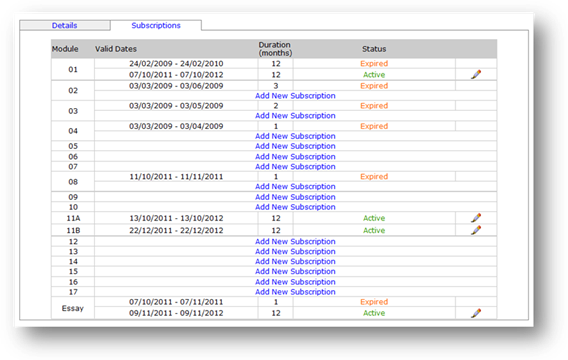
Then:
1. Click the Subscriptions tab.
2. Click the Add New Subscription link for the Module you want to subscribe the administrator to.
3.
In the pop-up: Select the subscription Start Date (default is present date)
and select the subscription End Date. For both, you can either type the date
directly (format dd/mm/yyyy), or click the Calendar
pop-up tool (  ), and
select the date from the Calendar. Alternatively
(for End Date) you can select to calculate the End Date automatically by selecting
one of the pre-set durations from the dropdown menu. The default is 1-month.
), and
select the date from the Calendar. Alternatively
(for End Date) you can select to calculate the End Date automatically by selecting
one of the pre-set durations from the dropdown menu. The default is 1-month.
4. Click Save, to save the Subscription and close the pop-up.
You will notice that the administrator’s Subscription Start Date and End Date for that Module are now listed, and annunciates with the word Active in colour green.
You can edit this Subscription at any time by clicking on
the Subscription’s associated Edit
icon ().
When the Subscription has expired, if you want to continue the administrator’s access rights for a further period, you must start a new subscription, in a similar manner to that which was used to setup the first subscription (as described above).
Related Topics
Copyright (c) 2012 Total Training Support Ltd